Know which pins actually bring you sales.
Stop guessing which pins are worth making. This Excel tracker adds up every pin's results and shows which boards, keywords and products send people to your shop - and what to pin next.
Instant download after checkout. Secure payment by Stripe. Microsoft Excel 2010 or newer.

Pinterest shows you numbers. It does not tell you what to do next.
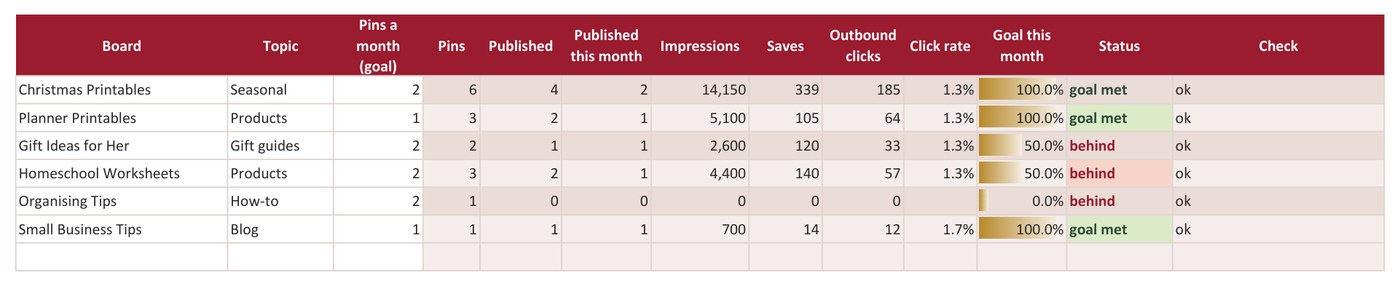
Which board is working?
Every board gets its own row: pins, impressions, saves, outbound clicks and click rate, added up for you.
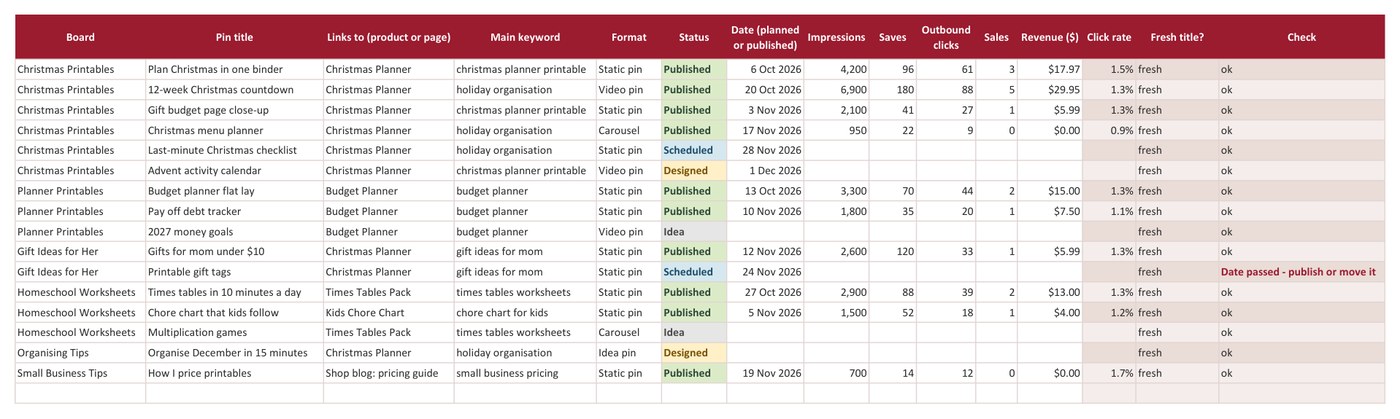
Which pins lead to sales?
Link each pin to the product it sells. The Products tab shows clicks, sales, revenue and clicks per sale for each one.
What should I pin next?
Pins to make lists every pin still at Idea or Designed, and each board shows whether it is on track for its monthly goal.
What is inside
Ten tabs. You type on four of them; the other six work themselves out.
- Room for 2,000 pins
- 50 boards
- 100 products
- 200 keywords
- Dropdowns, no retyping
- Plain formulas, no macros
- 2 copies: example + blank
How it works
Add your boards
Type each board and how many pins a month you want on it.
Add your products
The shop listings, blog posts or pages your pins send people to.
Log each pin
Pick the board and product from the dropdowns, then the status and date.
Paste in your stats
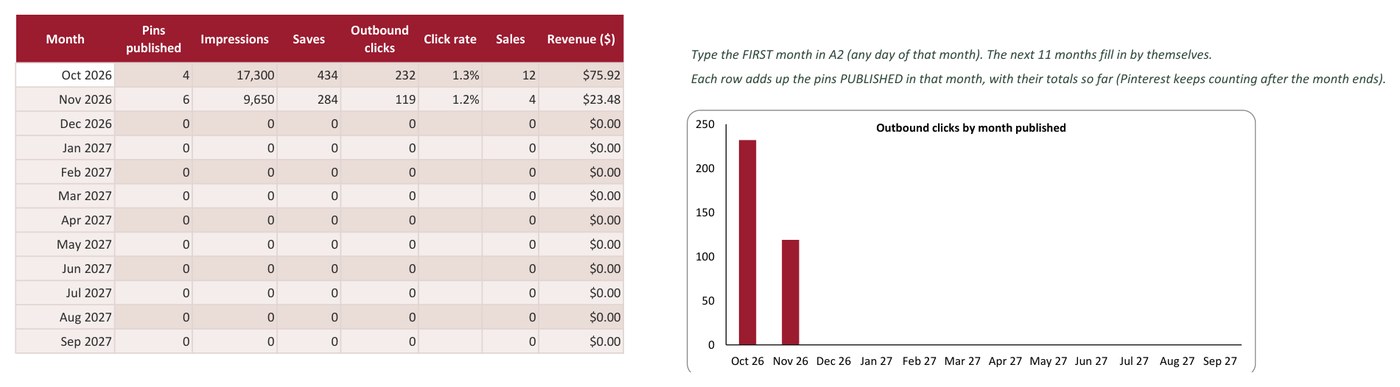
Once a week, copy impressions, saves and outbound clicks from Pinterest Analytics. Every total, chart and goal updates by itself.
See every tab before you buy
These are the real tabs, filled with the example shop that comes in the file.

Questions
Does it connect to my Pinterest account?
No. You copy the numbers in from Pinterest Analytics. Nothing logs in to your account and nothing leaves your computer.
Which programs does it work in?
Microsoft Excel 2010 or newer, including Microsoft 365. It was built and tested in Excel for Microsoft 365 on Windows. It uses plain formulas only, but it has not yet been tested in Excel for Mac, Google Sheets or Apple Numbers.
Can it see my Etsy or shop sales?
No. Pinterest does not report your shop's sales, so the sales columns are optional. If you know a sale came from a pin (for example, it arrived the day a pin took off, or the buyer told you), type it in and the tracker adds it up per pin, board, product and month. Clicks, saves and impressions work without it.
What do I get?
Two .xlsx files: one filled with an example shop so you can see how it works, and one blank, ready for your own boards and pins.
Does it use my currency?
Yes. The $ sign is only formatting, so any currency works.
Stop guessing which pins work.
Instant download after checkout. Secure payment by Stripe.